DIY SEO Tools for Small Business: A Practical Guide
Small-business owners often need better search visibility without the cost or complexity of a large SEO platform. The challenge is choosing a focused set of tools without creating duplicate reports, confusing scores, or unused subscriptions. A practical DIY setup should help you understand search demand, monitor performance, identify website issues, improve pages, and measure whether organic traffic drives inquiries or sales. For a small team, simplicity matters because every report must lead to useful action.
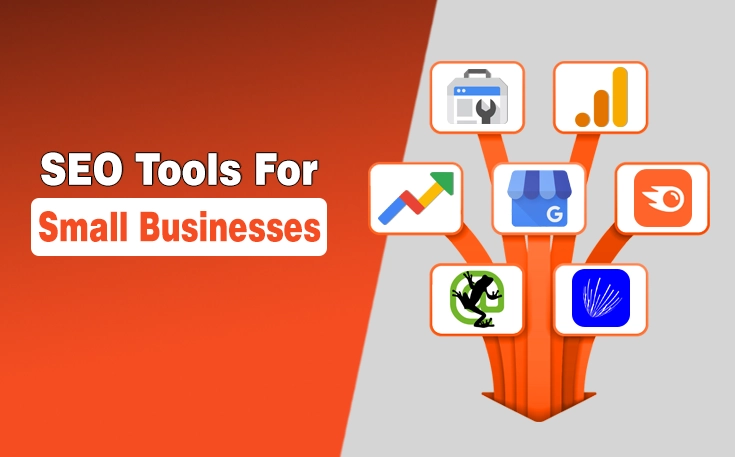
DIY SEO tools help small businesses research keywords, monitor search visibility, audit website health, improve content, and track visitor behavior. Most businesses need a focused stack built around Search Console, analytics, keyword research, performance testing, and one suitable audit or WordPress tool.
What Are DIY SEO Tools for Small Businesses?
DIY SEO tools collect and organize data about search performance, content, website health, and visitor behavior. They can show which queries bring impressions, where visitors arrive, whether pages load slowly, and which technical issues deserve attention.
What DIY SEO Tools Help You Manage
A sensible toolkit can support keyword research, on-page optimization, technical checks, local SEO, backlink monitoring, and reporting. For example, a family law firm might find that a service page appears for “child custody consultation” but receives few clicks. That insight creates a clear title and content-review task.
What SEO Tools Cannot Do Automatically?
Software does not understand your customers, priorities, or brand as well as you do. An audit may flag a long title, while a content score may suggest terms that do not improve the answer. Treat automated recommendations as evidence, not instructions. You still need to judge search intent, edit content, prioritize fixes, and connect SEO work with business outcomes.
How to Choose DIY SEO Tools for Your Business
The best stack is usually the smallest one that covers your recurring tasks.
Match Each Tool to a Specific SEO Task
Assign one purpose to each platform. Use Search Console to track Google search performance. Analytics can show what visitors do after arriving. A crawler can inspect site-wide technical elements. A local electrician with a 25-page website may gain more from free Google tools, a basic crawler, and a monthly spreadsheet than an enterprise platform.
Consider Skill Level and Learning Curve
Beginner-friendly software should make the next action understandable. A dashboard with hundreds of warnings is not useful when nobody knows which issue affects indexing, usability, or conversions. Choose tools that match your ability. Add advanced software only when reporting needs become more complex.
Compare Free Limits and Paid Features
Check crawl allowances, project limits, data history, exports, tracked keywords, and competitor access before subscribing.
Avoid Paying for Overlapping Features
Two suites may both offer keyword ideas, rank tracking, backlinks, and audits. Compare the features you will use monthly, not the total number advertised.
Best DIY SEO Tools for Small Business by Task
Google Search Console for Search Performance
Google Search Console’s performance report includes clicks, impressions, average click-through rate, average position, queries, and pages. Google also provides URL inspection and sitemap reporting to support indexing.
A plumbing company could filter for pages with high impressions but low click-through rates, then improve unclear titles before creating new content.
Google Analytics for Website Traffic
Google Analytics helps you study acquisition, landing pages, engagement, and user journeys. Its reports show how users arrive and what happens after the visit.
A bookkeeping firm could compare organic landing pages and track key events such as completed contact forms. Correct setup matters because poor tracking can hide useful results.
Google Trends and Keyword Planner for Keyword Research
Google Trends
Google Trends compares relative search interest across terms, locations, and periods. It can reveal related searches, regional differences, and seasonality, but it does not provide exact monthly search volume. A garden-maintenance company might compare “lawn care” with “garden maintenance” before planning service pages.
Google Keyword Planner
Keyword Planner discovers related keywords and provides estimated monthly searches. Google designed it for advertising research, so treat its volumes and forecasts as directional SEO inputs rather than guaranteed organic demand.
PageSpeed Insights for Website Performance
PageSpeed Insights assesses mobile and desktop performance using lab and real-world data. It reports Core Web Vitals and provides diagnostic suggestions, although some fixes require development knowledge.
A restaurant with oversized images may get useful loading recommendations, while deeper JavaScript issues may require technical support.
Screaming Frog for Technical SEO Audits
Screaming Frog SEO Spider crawls pages and exports URLs, titles, descriptions, headings, errors, and redirects. Its free version currently crawls up to 500 URLs per crawl, with advanced features restricted. It suits a small e-commerce store checking broken product links, duplicate titles, and redirect chains.
Ahrefs Free for Website Auditing
Ahrefs Free, formerly presented as Ahrefs Webmaster Tools, includes Web Analytics, Site Audit, and Site Explorer for verified websites. Current allowances include 5,000 crawl credits per verified project each month and up to 1,000 visible backlinks or keywords at once. It is most useful for analyzing sites you own. Broader competitor research may require paid access.
Yoast SEO for WordPress Optimization
Yoast SEO helps WordPress users manage XML sitemaps, schema output, SEO analysis, and site settings. Its sitemap updates when content changes, while its schema framework outputs connected structured data.
Its scores should support editorial judgment. A green indicator does not prove that a page satisfies search intent.
Microsoft Clarity for User Behavior
Microsoft Clarity provides heatmaps and session recordings showing clicks, scrolls, taps, and navigation. Click maps can highlight dead clicks and rage clicks.
A dental clinic might discover that visitors repeatedly click a non-linked insurance logo. Clarity reveals the usability issue, but it does not replace search analytics.
DIY SEO Tools Comparison
| Tool | Main use | Free option | Skill level | Main limitation |
| Google Search Console | Search performance and indexing | Yes. | Beginner | Google search data only |
| Google Analytics | Traffic and key events | Yes. | Beginner to intermediate | Setup must be accurate |
| Google Trends | Demand and seasonality | Yes. | Beginner | No exact monthly volume |
| Keyword Planner | Keyword ideas and estimates | Yes, with account access | Beginner | Built for advertising |
| PageSpeed Insights | Speed and Core Web Vitals | Yes. | Intermediate | Some fixes need development. |
| Screaming Frog | Technical crawling | Limited | Intermediate | 500-URL free limit |
| Ahrefs Free | Owned-site audits and backlinks | Limited | Intermediate | Verification and usage limits |
| Yoast SEO | WordPress SEO settings | Yes. | Beginner | Scores require judgement. |
| Microsoft Clarity | Heatmaps and recordings | Yes. | Beginner | Not a search analytics tool |
Free SEO Tools for Small Business: Starter Stacks
Starter Stack for a Local Service Business
Use Google Business Profile, Search Console, Analytics, PageSpeed Insights, and Clarity. Business profile reporting can include website clicks, calls, and direction requests.
Starter Stack for a Content-Based Website
Start with Search Console, Analytics, Google Trends, Keyword Planner, and a WordPress SEO plugin. Add a crawler when manual checks become unreliable.
Starter Stack for a Small Ecommerce Store
Combine Search Console, Analytics, PageSpeed Insights, Screaming Frog, and Ahrefs Free. A 300-product shop benefits more from systematic crawling than a five-page consultant website.
How to Do SEO Yourself Using These Tools
Step 1: Establish a Performance Baseline
Record organic clicks, impressions, landing pages, indexed-page issues, key events, and major speed problems. Save the date for consistent comparisons.
Step 2: Find Relevant Search Terms
Review Search Console queries, trend comparisons, customer questions, and Keyword Planner ideas. Choose topics connected directly to your services or products.
Step 3: Improve Existing Pages
Update pages with relevant impressions but weak clicks, outdated information, thin answers, or poor internal linking. A Dallas plumber might improve a “water heater repair” page before publishing another similar article.
Step 4: Fix Important Technical Problems
Prioritize blocked pages, broken internal links, incorrect redirects, slow templates, and duplicate metadata. Do not start with every low-priority warning.
Step 5: Track Progress Monthly
Monthly reviews are usually more practical than daily checks for a small team. Compare trends, note completed work, and investigate major changes.
Create a Simple Monthly SEO Report
Include organic clicks, impressions, top queries, landing pages, key events, local actions, technical fixes, and next-month priorities.
Examples of DIY SEO for Small Business
Local Plumbing Company
A plumber finds service pages with strong impressions but weak click-through rates, then rewrites unclear titles and adds precise service-area information.
Independent Business Consultant
A consultant compares advisory topics in Google Trends, checks related searches, and publishes one detailed page around a recurring client question.
Small Online Clothing Store
The retailer crawls its website and finds discontinued product links, duplicate category titles, and redirect chains. It fixes them in priority order.
Local Bakery
The bakery reviews business profile actions, landing pages, and clarity heatmaps. It discovers that mobile visitors struggle to find opening times, so it moves them higher.
Common Mistakes When Using Small Business SEO Software
Using Too Many Tools
More dashboards can create conflicting metrics and repeated recommendations. Start with one tool per task.
Treating SEO Scores as Google Rankings
Audit and plugin scores are internal guidance systems. They do not represent Google rankings or guarantee performance.
Collecting Data Without Taking Action
Each review should end with clear tasks, owners, priorities, and deadlines.
Tracking Rankings Without Tracking Outcomes
Higher rankings matter when they support qualified traffic, inquiries, bookings, subscriptions, or sales.
When DIY SEO Tools Are Not Enough
Specialist support may be sensible during a website migration, severe indexing loss, international expansion, security incident, or major e-commerce restructuring. These situations may affect many URLs and require server, code, analytics, and search expertise together. In such cases, SEO services for small business can provide additional technical support when DIY tools and internal expertise are not enough.
Tools can document symptoms and progress. However, high-risk changes without a rollback plan can make problems harder to diagnose.
Frequently Asked Questions
What are the best DIY SEO tools for beginners?
A strong beginner stack includes Google Search Console, Google Analytics, Google Trends, PageSpeed Insights, and a suitable website plugin. Add a crawler or backlink tool as your site grows.
Can a small business do SEO for free?
A small business can complete many essential SEO tasks using free tools. Paid software becomes useful when you need deeper competitor data, larger crawls, or regular rank tracking.
How many SEO tools does a small business need?
Most small businesses need four to six tools covering search performance, analytics, keyword research, technical checks, and website management.
Are free SEO tools accurate enough?
Free tools are accurate enough for many core tasks when they come from reliable providers and are configured correctly. Their main limits are usually depth, scale, or convenience.
How often should you check your SEO tools?
Check indexing or website problems after major changes, but review general performance monthly. Frequent checks help only when they lead to action.
Can DIY SEO tools replace an SEO professional?
DIY tools can handle routine data collection and many basic optimization tasks. They may not replace specialist judgment during complex technical, migration, international, or recovery work.
Final Thoughts
DIY SEO tools for small businesses work best as a focused operating system, not a collection of dashboards. Begin with free tools that answer specific questions, review the data consistently, and turn findings into practical improvements. Add paid software only when a real limitation blocks progress. The tools provide evidence; your customer knowledge and execution determine whether that evidence becomes useful growth.