CRM Software Cost: Pricing, Hidden Fees and Budget
CRM software prices can look straightforward until you calculate the full bill. The advertised rate may cover licences, but setup, migration, integrations, training, storage, and support can add to the total. A five-person team may need only a simple paid plan. A larger company could require advanced permissions, automation, and specialist implementation. Knowing these cost layers helps you build a realistic budget before signing a contract. It also prevents budget surprises after employees begin using the system.
CRM software can range from free plans to hundreds of dollars or pounds per user each month. Your real cost depends on users, features, implementation, migration, integrations, training, support, and add-ons.
How Much Does CRM Software Cost?
There is no single average that fits every business. CRM software cost is usually grouped into four broad levels:
| CRM level | Typical price pattern | Usually suitable for |
| Free | $0 with limits | Freelancers and very small teams |
| Entry-level | About $9–$25 per user monthly | Small teams needing basic pipelines |
| Mid-range | About $30–$100 per user monthly | Growing teams using automation |
| Advanced or enterprise | About $100–$500+ per user monthly | Larger organisations with complex needs |
These are planning guides, not fixed market rules. Country, currency, tax, billing cycle, features, and contract terms can change the final amount.
Current Public CRM Pricing Examples
Freshsales currently offers a free plan for up to 3 users and annual-billing plans from $9 to $59 per user per month. Pipedrive lists annual-billing plans from $14 to $79 per seat monthly. Microsoft Dynamics 365 Sales ranges from $65 to $150 per user monthly in the US and £50 to £115.30 in the UK, excluding tax or VAT.
Salesforce’s UK Sales Cloud page currently ranges from a free suite to £440 per user monthly for its highest listed sales edition. Public prices can change, so check them again before publication or purchase.
CRM Software Pricing Models
Two CRMs with similar headline prices can produce different annual bills. The pricing model determines what increases the cost as your team grows.
Per-User Pricing
Per-user pricing charges for every paid seat. For example, a $39 plan costs $195 monthly for five users, $780 for 20 users, and $1,950 for 50 users.
That calculation excludes tax, onboarding, integrations, and add-ons.
Full Seats and Limited Seats
Not every employee needs full access. Sales representatives may need complete features, while managers or external partners may only need viewing rights.
Check whether the vendor offers lower-cost limited seats. Occasional users can otherwise inflate the budget.
Flat Monthly Pricing
A flat plan charges one account fee for a set package. It may include several users, pipelines, or contacts.
Limits still matter. A business may be forced into a higher tier after exceeding user, storage, automation, or reporting allowances.
Contact-Based and Usage-Based Pricing
Some platforms charge for marketing contacts, emails, phone usage, automation runs, API calls, or AI credits.
Freshsales Suite includes 500 marketing contacts in its listed plans and publishes add-on pricing for more contacts and certain AI usage.
Custom Enterprise Pricing
Enterprise CRM pricing may involve a negotiated quote. The agreement can include volume discounts, minimum user commitments, support, implementation, security requirements, and custom development.
The licence price should not be reviewed alone. A complex rollout may cost more to implement than to license.
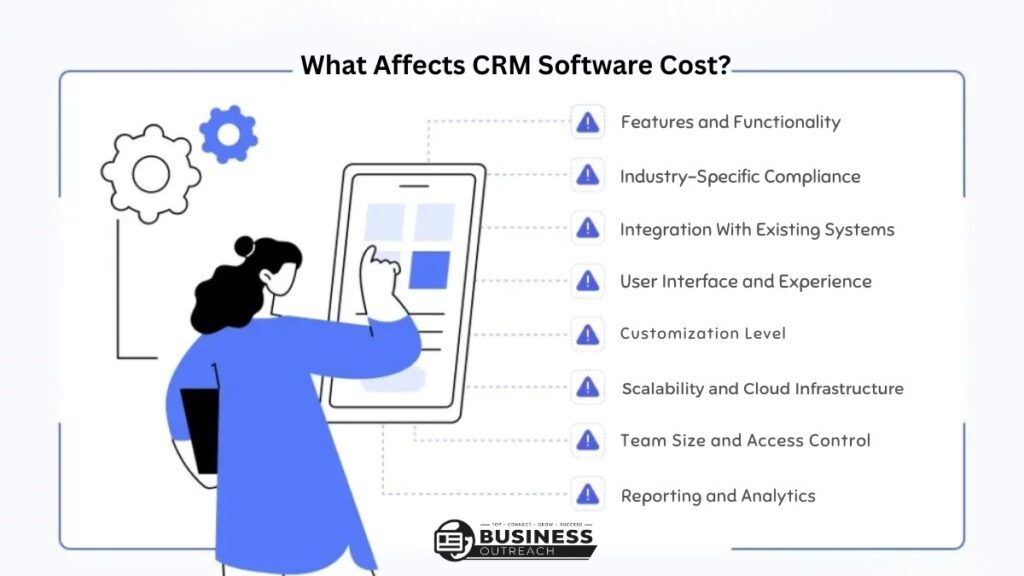
What Affects CRM Software Cost?
The number of users is important, but several other factors shape the budget.
Features and Plan Level
Basic plans may include contacts, deals, tasks, and simple reports. Higher tiers often add:
- Workflow automation
- Sales forecasting
- Custom dashboards
- Advanced permissions
- Audit logs
- AI assistance
- Sandbox environments
- Custom modules
Paying for advanced features only makes sense when the business will use them.
Data, Storage, and Communication
Large databases can create contact or storage charges. Email sending, calling, recording, and AI usage may also have separate limits.
A recruitment agency storing 80,000 contacts may face a different cost from a consultancy managing 2,000 records, even if both have ten users.
Integrations and Contract Terms
Connecting accounting, marketing, support, ecommerce, or analytics software may require a higher plan or paid connector.
Annual billing can reduce the monthly equivalent but creates a longer commitment. Review renewal terms, minimum seats, downgrade rules, cancellation conditions, and taxes.
CRM Cost by Business Size
Business size provides a starting point, although process complexity can matter more than headcount.
| Business type | Possible licence budget | Common extra costs |
| Solo professional | $0–$300 per year | Importing contacts and email setup |
| Five-user small business | $540–$6,000 per year | Training, migration, and integrations |
| Twenty-user sales team | $3,360–$36,000 per year | Automation, reporting, and administration |
| Enterprise department | $100,000+ per year | Consulting, security, migration, and support |
These are illustrative ranges based on public per-user pricing, not guaranteed quotations.
Solopreneurs and Small Teams
A freelancer may manage contacts and follow-ups with a free CRM. Costs appear when they need automation, more storage, better reports, or additional users.
A five-user company paying $9 per user monthly would spend $540 annually. At $59 per user, the licence cost becomes $3,540.
Growing and Mid-Sized Companies
A 20-user B2B team paying $65 per user monthly would spend $15,600 annually. It may also need workflow configuration, dashboards, training, and a CRM administrator.
As several departments join the system, permissions and data governance become more important.
Enterprise Organisations
A 100-user department paying $150 per user monthly would spend $180,000 annually before implementation.
Security reviews, multiple databases, custom integrations, testing environments, consultants, and administration can increase the total substantially.
CRM Implementation Cost and Hidden Fees
Implementation is the work required to turn a new account into a usable business system. It can be minimal for a basic CRM and substantial for a complex platform.
Initial Setup and Configuration
Setup may include pipelines, fields, roles, permissions, dashboards, workflow rules, and email connections. A small team may handle this internally. A larger business may need a consultant.
Data Migration and Cleanup
Migration involves more than uploading a spreadsheet.
Data Cleanup
Old records may contain duplicates, missing fields, outdated information, and inconsistent formats. Cleaning the data before import reduces errors later.
Import Testing
A test import should confirm field mapping, ownership, dates, currencies, notes, and linked records before the complete move.
Integrations and Development
Standard integrations may be included. Complex connections can require middleware, API access, or custom development.
A distributor connecting inventory, quoting, accounting, and support systems may spend more on integration than an agency using only email sync.
Training, Support, and Administration
Employees need role-based training, while managers need reporting guidance.
Some providers also charge onboarding fees. HubSpot currently lists required one-time onboarding of $1,500 for Sales Hub Professional and $3,500 for Enterprise, in addition to subscription charges.
Other costs may include premium support, storage, AI credits, extra contacts, phone usage, and internal administration.
Free vs Paid CRM Software
A free CRM is not automatically too limited, and a paid system is not automatically better.
| Free CRM may be enough when | Paid CRM may be necessary when |
| The team has few users | More users need full access |
| One simple pipeline is sufficient | Several pipelines are involved |
| Manual follow-up is manageable | Automation is required |
| Basic reports are enough | Forecasting and custom reports are needed |
| Support needs are limited | Faster support is important |
Freshsales and Zoho CRM both currently advertise free editions for up to three users. Limits still differ by platform. Our guide to CRM software examples compares the free tiers side by side.
Paying for unused automation creates waste. Staying on a restricted free plan can also create labour costs when staff rely on spreadsheets and manual updates.
How to Calculate CRM Total Cost of Ownership
Total cost of ownership includes direct payments and the internal time needed to run the system.
First-Year CRM Cost
Use this formula:
Annual licences + setup + migration + integrations + training + support + internal administration
Consider a five-user company paying $39 per user monthly:
| First-year item | Illustrative cost |
| Annual licences | $2,340 |
| Setup and migration | $1,200 |
| Training | $500 |
| Internal administration | $1,000 |
| Estimated first-year total | $5,040 |
The advertised licence cost represents less than half of this example’s first-year total.
Ongoing Annual CRM Cost
Recurring cost can include licences, new users, add-ons, support, maintenance, and administration.
Implementation may decrease after launch. Added users, contacts, storage, and integrations can push the ongoing cost upward.
Examples of CRM Software Cost
Five-User Local Service Company
A plumbing company uses a CRM for enquiries, estimates, follow-ups, and booked jobs. At $14 per user monthly, annual licences cost $840.
If the owner imports data internally and uses standard email integration, the first-year total may stay below $2,000.
Twenty-User B2B Sales Team
A software company needs email sync, sequences, forecasting, dashboards, permissions, and training.
At $65 per user monthly, annual licences cost $15,600. Configuration, migration, integration, and training could add several thousand dollars.
One-Hundred-User Enterprise Department
A financial services department requires strict permissions, audit controls, custom workflows, migration, integrations, and formal support.
At $150 per user monthly, licences alone cost $180,000 per year. Consulting, security reviews, testing, and administration could materially increase the total.
How to Control CRM Software Costs
- Map the real workflow. Identify what employees need to do inside the CRM.
- Separate essential and optional features. Avoid paying for tools nobody will use.
- Count full users carefully. Check whether occasional users need paid seats.
- Request every extra cost. Include onboarding, migration, storage, support, and add-ons.
- Compare first-year and recurring totals. Do not compare headline prices alone.
- Growth plan. Estimate users and contacts for the next 12 months.
- Review contract terms. Check renewal, cancellation, downgrade, tax, and billing conditions.
Frequently Asked Questions
How much does CRM software cost per month?
CRM software can cost $0 for a limited plan or more than $500 per user monthly for advanced editions. Many small and mid-market plans fall between roughly $9 and $150 per user monthly.
Is CRM software usually priced per user?
CRM software is often priced per user or seat. Some providers also use flat account fees, contact allowances, usage charges, or custom enterprise quotations.
How much does CRM implementation cost?
CRM implementation can cost almost nothing when a small team performs a basic setup internally. Complex migration, customisation, integrations, testing, and training can make it a significant project.
What hidden CRM costs should a business expect?
Common hidden costs include onboarding, migration, data cleanup, integrations, storage, AI usage, additional contacts, premium support, and administration.
Is a free CRM enough for a small business?
A free CRM can be enough for a small business with few users and a simple process. A paid plan becomes more likely when the team needs automation, advanced reporting, stronger permissions, or support.
Is CRM software worth the cost?
CRM software can be worth the cost when it reduces manual work, improves follow-up, and creates reliable customer data. Its value depends on adoption and actual feature use.
Final Thoughts
CRM software cost is more than the number shown on a pricing page. Licences, implementation, migration, integrations, training, support, and administration all shape the real budget. Start with the first-year total, then calculate the ongoing annual cost. Compare both figures with current needs and expected growth. This gives you a clearer basis for choosing a suitable plan without overspending or overlooking expenses that appear after launch.