CRM System for Small Business: Features, Costs and Uses
Managing customers through spreadsheets, emails, and manual notes may work when a business is still small. As inquiries increase, customer details become scattered, follow-ups are missed, and sales activity becomes harder to track. A CRM system for small business brings contacts, conversations, tasks, leads, and deal information into one organised place. It can improve visibility and accountability without forcing a small team into an overly complex operating system.
A CRM system helps a small business organise customer data, manage leads, schedule follow-ups, and monitor sales progress. The best system is easy to use, secure, affordable, and compatible with the tools your team already relies on.
What Is a CRM System for Small Business?
CRM stands for customer relationship management. It describes the processes and technology a business uses to manage relationships with potential and existing customers.
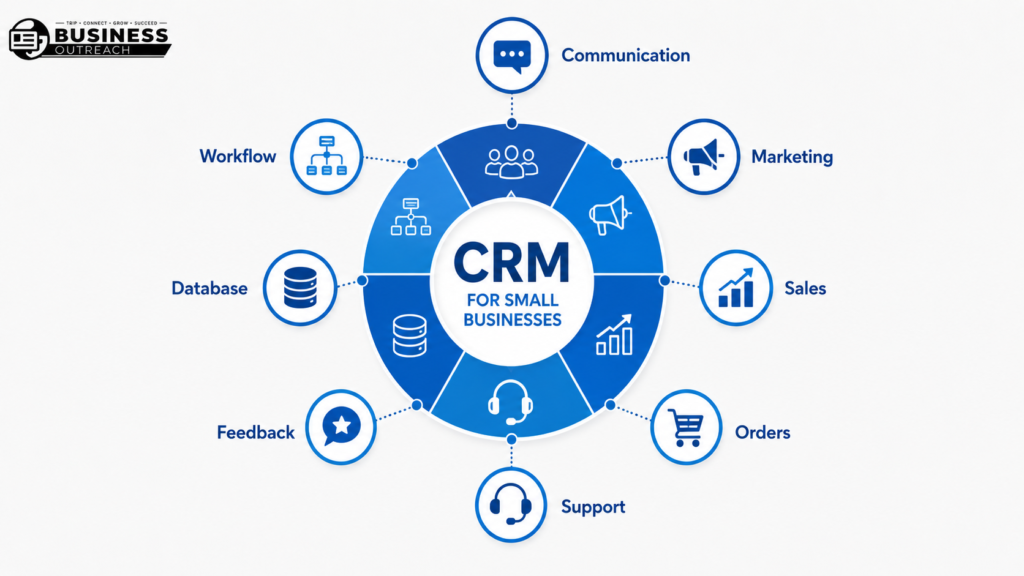
A small business CRM may store contact details, calls, emails, notes, tasks, quotations, sales stages, and service history. Instead of searching several inboxes or files, authorised employees can view the same updated record.
For example, a two-person property maintenance company can route phone, email, and website inquiries into a single pipeline. The team can then see which customer needs a quotation, visit, or follow-up.
How a Small Business CRM Works
A CRM creates a record for each customer or lead. Information may be entered manually or collected through connected email accounts, forms, calendars, and other business tools.
Each lead can move through stages such as new inquiry, qualified lead, proposal sent, won, or lost. Tasks and reminders show who should act next.
The system supports the process, but it cannot design that process for you. Your business still needs clear rules for ownership, sales stages, and customer-data handling.
Benefits of CRM for Small Business
Centralised Customer Information
A CRM provides the team with a single reliable place to view customer details and previous activity. This reduces time spent checking separate spreadsheets, inboxes, and messaging apps.
A small accounting firm, for example, can review a client’s last conversation, missing documents, and next deadline before returning a call.
Better Lead and Follow-Up Management
Leads are easily lost when follow-ups depend on memory or handwritten notes. A CRM can assign ownership, create reminders, and display overdue actions.
A renovation company receiving 25 inquiries each week may separate urgent site visits from prospects still waiting for an estimate.
Improved Sales Visibility
A visual sales pipeline shows how many opportunities are active and where deals are slowing down. It also helps owners estimate future work more realistically.
A B2B training provider may notice that many proposals receive no second follow-up. That pattern reveals a process gap.
More Consistent Customer Service
Shared records help employees respond with context, so customers do not repeat the same details. Permissions should still limit access to information each employee genuinely needs.
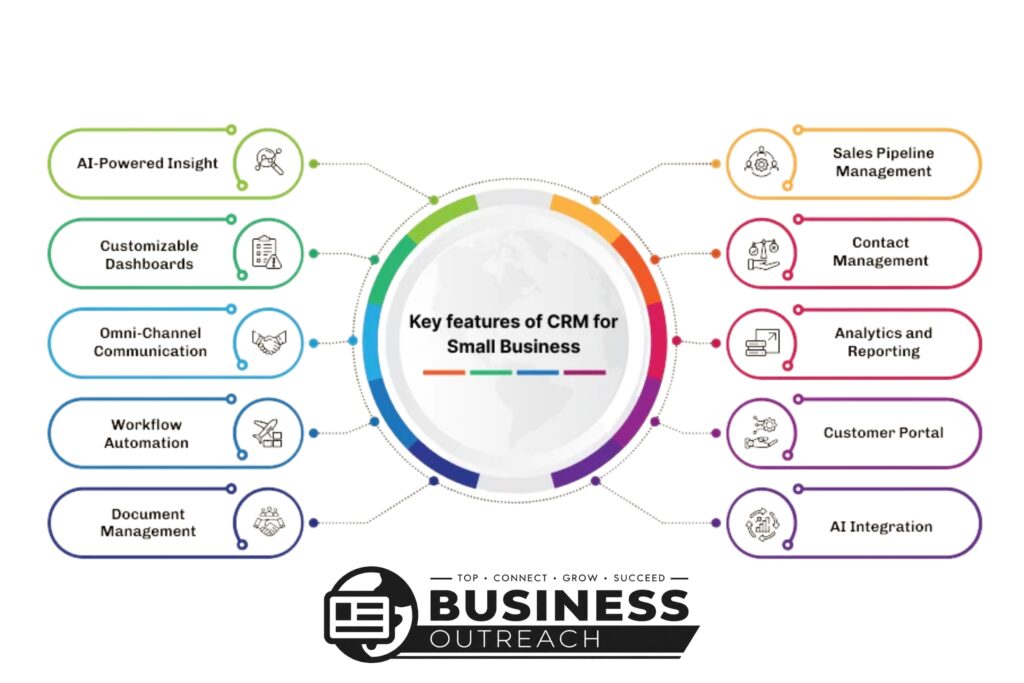
Small Business CRM Features That Matter Most
Contact and Lead Management
Contact management is the foundation of a CRM. The system should make it easy to create, search, update, segment, export, and merge records.
Useful fields depend on the business. An insurance broker may need renewal dates, while a design agency may prioritise budget range and proposal status.
Sales Pipeline Tracking
A sales pipeline shows where each lead sits in the buying process. Its stages should reflect the business’s actual workflow.
A catering company might use inquiry received, menu discussed, quote sent, deposit paid, and event completed.
Task and Workflow Automation
Automation can assign inquiries, create reminders, update fields, or trigger routine emails in response to specific actions.
Start small. Automating an unclear process can quickly spread errors. Test one repetitive task before expanding automation.
Email and Calendar Integration
Email and calendar integrations can connect messages, meetings, and calls to customer records. This reduces manual data entry and gives employees better context.
Not every email should be entered into the CRM. Businesses need clear rules about which communications are relevant.
Reporting and Dashboards
Reports can show lead sources, conversion stages, overdue tasks, and team activity. Small businesses rarely need dozens of dashboards.
A dental clinic may only need to compare new inquiries, booked consultations, completed appointments, and no-response cases.
Mobile Access and Data Security
Mobile access helps field teams update records away from a desk. Security should receive equal attention.
Review access controls, multi-factor authentication, backups, vendor policies, data-export options, and procedures for removing former employees.
Types of CRM for Small Business
Operational CRM
Operational CRM supports everyday sales, marketing, and customer-service work. It focuses on moving contacts through defined processes and reducing repetitive administration.
Best Fit
It suits businesses that need clearer lead handling, such as a solar installer assigning inquiries and tracking quotations.
Analytical CRM
Analytical CRM focuses on reports, patterns, and customer behavior. It helps compare sales performance, lead sources, or customer groups.
Best Fit
It works best when a business already collects enough accurate data to analyse.
Collaborative CRM
Collaborative CRM helps sales, service, delivery, and account-management teams share relevant customer information.
Best Fit
It may suit an agency where one person sells the service, another delivers it, and a third manages support.
Many platforms combine these approaches. The category matters less than whether the system supports your real workflow.
CRM vs Spreadsheet for Small Business
| Factor | CRM System | Spreadsheet |
| Contact management | Connected, searchable records | Manual rows and fields |
| Follow-up tracking | Tasks, reminders, and ownership | Manual updates |
| Collaboration | Shared current records | Version conflicts may occur |
| Reporting | Built-in views and dashboards | Formulas and manual setup |
| Scalability | Better for growing activity | Harder to maintain at scale |
| Cost | Setup or subscription expenses | Low initial software cost |
A spreadsheet may be enough for a solo business with a small contact list and simple sales process. It is inexpensive, flexible, and familiar.
Problems appear when several people update the same file, customer history sits elsewhere, or follow-ups depend on manual checks. At that stage, a CRM may provide better structure.
A freelance photographer managing ten active clients may not need a CRM. A five-person studio handling 150 inquiries probably needs stronger tracking and shared ownership.
How to Choose a CRM for Small Business
Identify the Main Business Problem
Start with the problem, not the software. Decide whether the main issue is missed follow-ups, scattered data, weak sales visibility, inconsistent service, or slow administration.
One clear problem produces a better shortlist than a long wish list.
Prioritise Essential Features
Separate must-have features from attractive extras. Most small businesses should first assess contact management, pipeline tracking, task ownership, reporting, integrations, usability, and data export.
Advanced customization may increase costs without addressing an immediate need.
Check Ease of Use and Team Adoption
A powerful CRM has little value if employees avoid it. Ask a small group to test adding a lead, updating a deal, finding a record, and creating a follow-up.
Watch where users hesitate or need help.
Review Integrations
List the tools the CRM must connect with, such as email, calendars, website forms, accounting software, support platforms, or ecommerce systems.
Confirm what each integration transfers. Some only sync limited fields or require a higher-priced plan.
Calculate the Full CRM Cost
Subscription and User Fees
CRM pricing may depend on users, storage, contact limits, features, billing cycles, and regional taxes. Entry-level plans can become expensive as a team grows.
Setup, Migration and Training Costs
The monthly fee is only one part of the cost. Budget for data cleaning, setup, migration, training, support, administration, and possible consultancy.
Consider Security and Future Growth
Review role-based permissions, authentication, backups, audit history, data export, and vendor security information. Remove access promptly when someone leaves.
The Cybersecurity for Small Business recommends protecting sensitive data and assessing vendors. UK businesses should also follow the principles, including minimisation, accuracy, retention, security, and accountability.
The system should support growth without forcing the business to pay for unnecessary enterprise features today.
Examples of CRM Use in Small Businesses
A Dallas plumbing company uses CRM software to record website inquiries, assign urgent calls, schedule estimates, and follow up on open quotations. For more practical use cases, read our complete guide to CRM software examples.
A London recruitment agency connects employer conversations, vacancies, candidate notes, interviews, and placement stages.
An online clothing store tracks customer questions, delivery issues, returns, and repeat-purchase opportunities without mixing them across several inboxes.
A small B2B consultancy manages discovery calls, proposals, project start dates, and renewal reminders. The CRM supports judgment; it does not replace it.
CRM Implementation for Small Business
Define the CRM Workflow
Map how a lead enters the business, who responds, what stages follow, and when the opportunity closes. Keep the first version simple.
Clean and Prepare Existing Data
Remove Duplicate Records
Merge repeated contacts and keep the most accurate information. Duplicate data can distort reports and create confusing communication.
Standardise Contact Fields
Use consistent formats for names, phone numbers, countries, lead sources, and dates. Standardised data is easier to search and analyse.
Import Only Useful Information
Do not move every old note into the new system. Import information that supports an active relationship, legal requirement, reporting need, or genuine business purpose.
Train the Team
Train employees using normal tasks. Show them how to add a lead, update a stage, create a reminder, find a record, and report an error.
Start With Core Features
Launch contact management, pipeline tracking, and essential reminders first. Add reports and automation after the basic workflow becomes consistent.
Review Adoption and Data Quality
Regularly check incomplete records, overdue tasks, duplicates, inactive users, and incorrect stages. A CRM needs ongoing ownership after launch.
Common CRM Mistakes Small Businesses Make
Choosing too many features can slow setup and discourage adoption. Start with the smallest system that solves the main problem.
Poor-quality data creates immediate confusion. A wholesaler importing duplicate contacts and outdated phone numbers will produce unreliable reports from day one.
Weak training is another common issue. Employees need to understand both how to use the CRM and why accurate updates matter.
Businesses also automate too early. Test the manual process first, then automate only clear and repeatable steps.
Finally, do not treat the subscription as the full cost. Migration, integrations, support, administration, training, and upgrades can affect the real budget.
Frequently Asked Questions
Is a CRM worth it for a small business?
A CRM is worth considering when managing customer records, leads, and follow-ups has become difficult to do consistently. A very small business with a simple process may still work well with a maintained spreadsheet.
When should a small business start using CRM?
A small business should consider CRM when inquiries are missed, several people handle customers, or sales activity lacks clear ownership. Introducing a simple system early can prevent disorder later.
How much does a CRM cost for a small business?
CRM costs vary by provider, user count, features, storage, setup, and billing plan. Compare subscription, migration, training, integration, administration, and upgrade costs before choosing.
Is a free CRM enough for a small business?
A free CRM can be enough for a small team with basic contact and pipeline needs. Check limits on users, records, automation, reporting, support, integrations, and data export.
Can CRM replace spreadsheets?
A CRM can replace customer and sales spreadsheets when shared records, reminders, permissions, and pipeline tracking are required. Spreadsheets may remain useful for calculations or one-off analysis.
What CRM feature should a small business use first?
Contact management is usually the best feature to introduce first. Once records are clean and consistently updated, add pipeline stages, reminders, reports, and automation.
Final Thoughts
A CRM system for small business should make customer work clearer, not more complicated. Begin with the problems your team already faces, then choose the features needed to solve them. The strongest option is not always the system with the longest feature list. Usability, accurate data, sensible costs, security, and consistent team adoption matter more. A spreadsheet may remain enough for a simple operation, while a growing team may benefit from structured records and clear follow-up ownership.