Business Model Canvas: 9 Building Blocks and How to Use Them
A Business Model Canvas gives entrepreneurs and teams a simple way to see how the major parts of a business fit together on one page. It maps customers, value, revenue, operations, partnerships, and costs without requiring a long planning document first. The canvas helps organize ideas and identify assumptions, but filling all nine boxes doesn’t prove a business model will work. Those assumptions still need research, testing, and evidence.
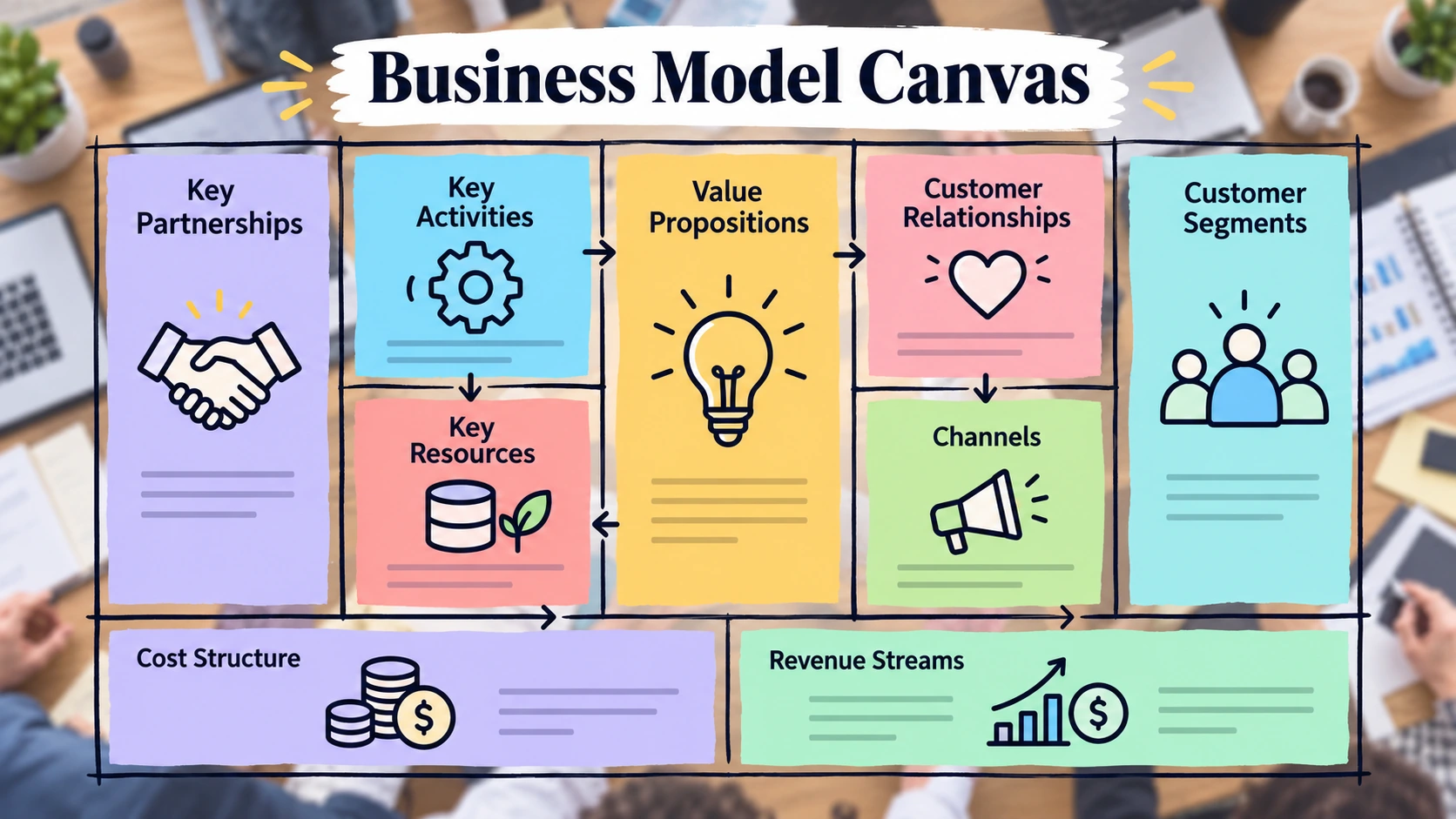
A Business Model Canvas is a one-page framework for mapping how a business creates, delivers, and captures value through nine connected building blocks. It covers customers, value propositions, channels, relationships, revenue, resources, activities, partners, and costs, helping teams make assumptions visible so they can be discussed, tested, and improved.
What Is a Business Model Canvas?
The Business Model Canvas is a visual framework used to describe the logic behind a business. Instead of explaining the model across many pages, it organizes the most important elements into nine connected areas.
Its purpose is not to predict success. It helps founders, managers, consultants, students, and teams express what they currently believe about the business and identify which assumptions still require evidence. Treat a completed canvas as a working model rather than a final answer.
What Is the Purpose of a Business Model Canvas?
The canvas helps turn a broad business idea into a clearer picture of how you may create, deliver, and monetize value. Teams can use it to identify gaps, compare alternatives, clarify responsibilities, and understand how one business decision may affect another. It also helps teams evaluate their business model before moving into more detailed operational or financial planning.
Visualize -> Discuss -> Test -> Learn -> Update
The canvas becomes more useful as the business learns and changes.
What Are the 9 Building Blocks?
The framework contains nine core building blocks.
| Customer Segments | Who are we serving? |
| Value Propositions | Why should they choose us? |
| Channels | How do we reach them? |
| Customer Relationships | How do we interact with them? |
| Revenue Streams | How does money come in? |
| Key Resources | What assets are essential? |
| Key Activities | What must we do well? |
| Key Partnerships | Who helps the model work? |
| Cost Structure | What major costs are involved? |
These blocks should be considered together. For example, a change in the customer may also change pricing, channels, support requirements, resources, and costs.
1. Customer Segments
Customer Segments identify the people or organizations a business intends to serve. The definition should be specific enough to show who has the problem, who uses the product, and who pays for it. In some businesses, these may be different people. An employee may use a software product while a manager approves it and the company pays.
- Who receives the value?
- Who pays?
- Which customers have the strongest need?
- Do different segments require different offers?
A segment defined simply as “everyone” usually provides too little direction.
2. Value Propositions
The Value Proposition explains why a specific customer should care about the offer. It should connect a customer problem or need with a meaningful outcome. Features alone are not enough. For example, “automated reporting” is a feature. “Reducing the time managers spend preparing weekly reports” explains the value behind that feature.
Customer Need -> Desired Outcome -> Value Proposition.
The stronger this connection, the easier it is to decide on pricing, channels, and customer relationships.
3. Channels
Channels describe how customers discover, evaluate, purchase, and receive the offer. They can operate across the full customer journey:
Awareness -> Evaluation -> Purchase -> Delivery -> After-Sales
- websites
- mobile apps
- direct sales teams
- marketplaces
- retail locations
- distributors
- partners
A business may use different channels for different stages. A software company could attract prospects through search and content, close larger customers through direct sales, and deliver the service through an online platform.
4. Customer Relationships
Customer Relationships describe how the business interacts with customers before and after purchase. Possible models include self-service, automated support, personal assistance, dedicated account management, onboarding teams, and customer communities.
This block is different from Channels. Channels explain how the business reaches and serves customers, while Customer Relationships describe the type of interaction the business maintains. The choice also affects cost. For example, dedicated account management usually requires more human resources than a largely self-service model.
5. Revenue Streams
Revenue Streams explain what customers pay for and how money enters the business.
- one-time sales
- subscriptions
- usage fees
- commissions
- licensing
- transaction charges
- service fees
A company may charge recurring monthly or annual fees, while another business may earn money each time a transaction occurs. Revenue Streams should not be confused with revenue forecasts. The first explains how money is earned; the second estimates how much may be earned. Revenue also does not equal profit because the cost side of the model still matters.
6. Key Resources
Key Resources are the assets and capabilities required to make the business model work. Depending on the company, these may include employees, technology, intellectual property, equipment, brand assets, data, capital, or infrastructure.
Not every business resource belongs in this box. Focus on assets essential to delivering the value proposition, operating key channels, supporting customer relationships, or earning revenue. What must the business have access to for this model to function?
7. Key Activities
Key Activities are the most important actions the company must perform well. Examples include product development, manufacturing, platform management, logistics, sales, marketing, quality control, and customer support.
Resources and activities differ: Resources are what the business needs. Activities are what the business must do. Listing every routine task makes the canvas less useful. Only activities that are central to the business model should appear here.
8. Key Partnerships
Key Partnerships identify external relationships that are particularly important to the model. These may include suppliers, technology providers, logistics companies, distributors, strategic alliances, or outsourced specialists.
Not every vendor needs to be listed. A stronger test is to ask what would become difficult, expensive, or impossible if a particular relationship disappeared. That helps distinguish ordinary suppliers from partners that genuinely support the business model.
9. Cost Structure
Cost Structure identifies the major expenses required to operate the model. Typical costs may include salaries, technology, cloud infrastructure, rent, manufacturing, marketing, distribution, customer support, and payment processing.
Some costs remain relatively stable for a period, while others rise or fall with activity. For example, salaries may behave differently from transaction fees or shipping costs. The canvas identifies major cost drivers, but it does not replace detailed budgeting or financial forecasting.
How the 9 Blocks Work Together
The strongest canvases show logical connections between the blocks.
Customer Segment -> Value Proposition -> Channel -> Relationship -> Revenue
Resources -> Activities -> Partnerships -> Costs
Suppose a company changes its target from small businesses to large enterprises. It may now need direct sales, stronger onboarding, account managers, additional security capabilities, longer contracts, and more support staff. One change can therefore reshape several parts of the model.
How to Create a Business Model Canvas
A practical approach is to start with customers and value rather than filling the boxes randomly. First, identify the customer segment and the problem worth solving. Then define the value proposition and decide how customers will discover, buy, and receive the offer. After that, map customer relationships and revenue streams.
Next, identify the resources and activities required to deliver the promise, followed by important partnerships and major costs.
Customer -> Value -> Channels -> Relationships -> Revenue -> Resources -> Activities -> Partners -> Costs
Once the first version is complete, move from planning to validation:
Assumption -> Test -> Evidence -> Learning -> Revision
Business Model Canvas Example
Consider a fictional online project-management company designed to help small and midsize teams organize their work.
| Customer Segments | Small and midsize teams |
| Value Proposition | Simpler project coordination |
| Channels | Website, content, direct sales |
| Customer Relationships | Self-service plus support |
| Revenue Streams | Monthly and annual subscriptions |
| Key Resources | Software, developers, infrastructure |
| Key Activities | Development, support, marketing |
| Key Partnerships | Cloud and payment providers |
| Cost Structure | Salaries, hosting, support, marketing |
The useful part is not simply filling every box. The model must make sense as a whole. Small teams need easier project coordination, so the company provides an online tool. It reaches customers digitally, earns subscription revenue, relies on software and developers, works with technology providers, and carries hosting, staffing, support, and marketing costs. This is an illustration, not a universal SaaS template.
Business Model Canvas vs Business Plan
The two tools serve related but different purposes.
| Format | One-page visual | Detailed document |
| Main Purpose | Model design and assumptions | Planning and execution |
| Detail Level | High-level | Extensive |
| Financial Depth | Limited | Often detailed |
| Revision | Fast | Usually more involved |
| Best Use | Exploration and iteration | Formal planning |
The canvas helps clarify how the business is expected to work. A detailed guide on writing a business plan can go further into market research, financial projections, operations, implementation, and execution. One does not automatically replace the other.
How Does It Compare With Lean Canvas and Value Proposition Canvas?
Lean Canvas and Value Proposition Canvas are related tools, but they serve different purposes. Lean Canvas is an adaptation with a stronger emphasis on startup problems, solutions, key metrics, and early-stage uncertainty.
The Value Proposition Canvas focuses more deeply on the relationship between a customer segment and the value offered, including customer jobs, pains, gains, products, pain relievers, and gain creators.
Business Model Canvas -> Whole business model
Value Proposition Canvas -> Customer-value fit
They should not be treated as identical templates.
Benefits of Using a Business Model Canvas
One advantage of the canvas is that it lets you view key business assumptions at once instead of burying them in a long document. It can help teams compare alternative customer segments, pricing approaches, distribution channels, or operating models. Because the format is concise, teams can also make revisions quickly as new information emerges.
Other potential benefits include clearer team discussions, easier gap identification, and a better understanding of how customer-facing decisions affect operations and costs.
Limitations of the Business Model Canvas
The canvas’s simplicity is also a limitation. It does not replace customer research, detailed financial forecasts, competitor analysis, legal planning, operational procedures, or implementation plans.
A clean-looking canvas can still contain incorrect assumptions. Writing that customers will pay a certain price does not prove willingness to pay, just as identifying a target market does not prove demand exists. The canvas is strongest when you treat it as something to test rather than defend.
How to Test and Update the Canvas
Testing should focus first on assumptions that are both important and uncertain.
Importance x Uncertainty = Validation Priority
This is not a financial formula. It is simply a way to decide which questions deserve attention first. High-priority assumptions may include whether customers actually experience the problem, whether they care enough to act, whether they will pay, whether the chosen channel can reach them, and whether the economics can work.
Evidence may come from customer interviews, prototypes, sales conversations, usage behavior, pricing tests, paid pilots, purchases, renewals, or operational data. Dating each canvas version can also help teams see what changed and what evidence caused the change.
Common Business Model Canvas Mistakes
A common mistake is defining the customer too broadly. Another is filling the Value Proposition box with features rather than explaining why those features matter.
Other problems include confusing Channels with Customer Relationships, listing every routine task as a Key Activity, treating every vendor as a Key Partner, overlooking important costs, or using vague revenue descriptions. The most serious mistake is treating assumptions as verified facts. A completed canvas should create better questions, not false confidence.
How to Evaluate a Finished Business Model Canvas
A finished canvas should pass both a logic test and an evidence test.
Customer -> Problem -> Value -> Channel -> Relationship -> Revenue -> Resources -> Activities -> Partners -> Costs -> Evidence
Then ask whether the customer is clearly defined, the value proposition solves a meaningful problem, the channels fit that customer, and the relationship model is compatible with the price.
Also check whether the business can realistically deliver on its promise, access the necessary resources, maintain key partnerships, and cover its major costs. Finally, identify which statements are still assumptions rather than evidence-backed conclusions.
FAQs
What is a Business Model Canvas?
A Business Model Canvas is a one-page visual framework used to describe how a business creates, delivers, and captures value through nine connected building blocks.
What are the 9 parts of a Business Model Canvas?
The nine blocks are Customer Segments, Value Propositions, Channels, Customer Relationships, Revenue Streams, Key Resources, Key Activities, Key Partnerships, and Cost Structure.
What is the main purpose of a Business Model Canvas?
Its main purpose is to make a business model’s logic and assumptions visible so teams can discuss, compare, test, and improve them.
How do you fill out a Business Model Canvas?
Start with the customer and value proposition, then map channels, relationships, revenue, resources, activities, partnerships, and costs. After completing the first version, identify the assumptions that need testing.
What is the difference between a Business Model Canvas and a business plan?
A Business Model Canvas provides a concise visual overview of how a business model is expected to work. A business plan normally contains more detailed market, financial, operational, and execution planning.
How often should a Business Model Canvas be updated?
There is no fixed schedule. Review it when meaningful new evidence appears, such as customer feedback, sales results, pricing tests, operational data, or changes to the market or business model.
Final Thoughts
A Business Model Canvas makes a business model easier to understand by showing nine connected building blocks in one place. Its real value comes after the first draft, when you test assumptions against evidence and revise the model as the business learns.