12 Best Lead Generation Tools for Small Businesses
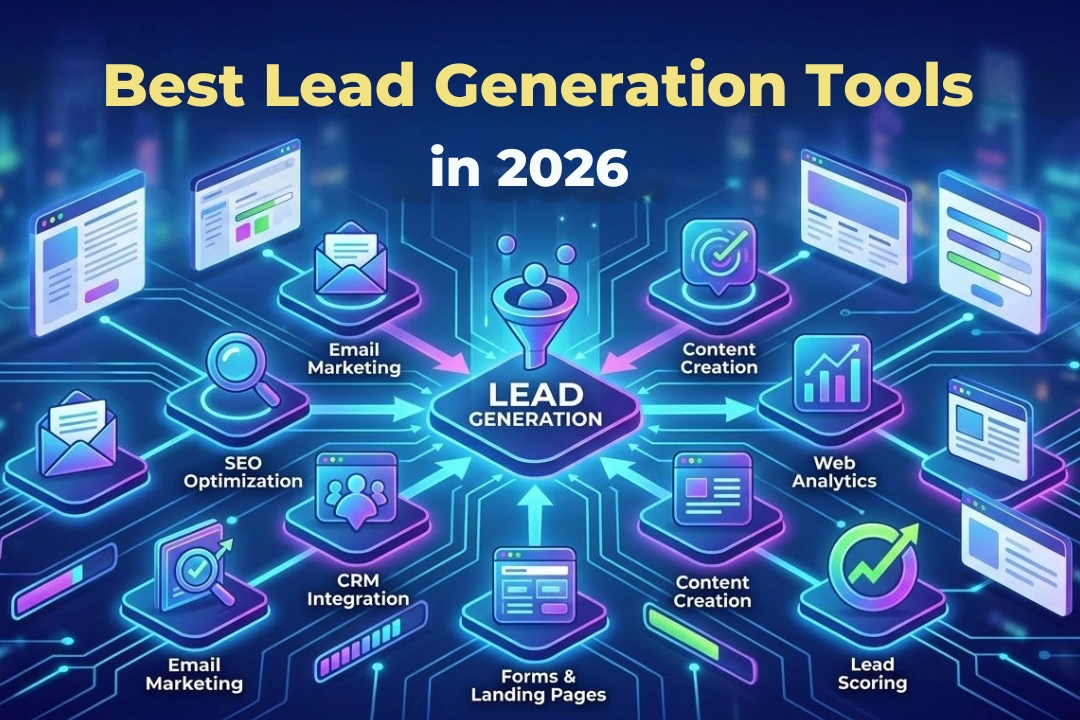
Small businesses rarely struggle because they lack software choices. The real problem is choosing a tool that matches how they attract, qualify, and follow up with potential customers. A local service company needs different features from a B2B agency or online store. This guide compares 12 lead generation tools across CRM, prospecting, website capture, landing pages, chat, and email nurturing. It focuses on practical fit, ease of use, free options, and limitations rather than treating one platform as suitable for every business.
The best lead generation tools for small businesses include HubSpot and Zoho CRM for all-in-one lead management, Apollo and LinkedIn Sales Navigator for B2B prospecting, and OptinMonster, Typeform, Unbounce, and Tidio for website lead capture. The right choice depends on your acquisition channel, budget, traffic level, and follow-up process.
What Are Lead Generation Tools?
Lead generation tools help a business attract prospects, collect details, identify suitable buyers, or move contacts toward a sales conversation. Some create forms and landing pages. Others find business contacts, run outreach, manage enquiries, or automate follow-up.
They aren’t all CRMs. A prospecting database finds possible buyers, while a CRM stores relationships and sales activity. A form builder captures interest but may not manage the pipeline.
For example, a Manchester accounting firm might use Sales Navigator to identify finance directors, Hunter to verify work emails, and a CRM to record replies.
Best Lead Generation Tools for Small Businesses Compared
| Tool | Best for | Main type | Free option | Main limitation |
| HubSpot | Combined capture and CRM | All-in-one platform | Yes | Paid expansion can become costly |
| Zoho CRM | Small sales teams | CRM and automation | Yes | Setup can require configuration |
| Apollo | B2B prospecting and outreach | Sales intelligence | Yes | Contact data needs checking |
| LinkedIn Sales Navigator | Decision maker research | Social prospecting | Trial varies | Outreach remains partly manual |
| Hunter | Finding professional emails | Email discovery | Yes | Not a complete CRM |
| Snov.io | Email prospecting sequences | Outreach platform | Trial or free access | Credit limits affect scale |
| OptinMonster | Website popups | Lead capture | No permanent free plan | Needs existing website traffic |
| Typeform | Interactive qualification forms | Form builder | Yes | Response limits can restrict growth |
| Unbounce | Paid campaign landing pages | Landing page platform | Trial | More than many simple sites need |
| Tidio | Chat-based lead capture | Live chat and chatbot | Yes | Advanced automation may cost more |
| Mailchimp | Email list growth | Email marketing | Yes | Not designed for contact discovery |
| Brevo | Affordable nurturing workflows | Email and CRM tools | Yes | Plan limits require comparison |
Pricing and plan limits change frequently, so verify the vendor’s current terms before publishing or buying.
All in One Lead Generation Software for Small Business
1. HubSpot
HubSpot combines CRM, forms, landing pages, live chat, meeting scheduling, pipelines, and reporting. Its free tools can suit a founder who wants website enquiries stored in one system. HubSpot confirms that forms and landing pages can pass submitted details into its CRM.
A small legal consultancy could capture consultation requests, assign them to a pipeline, and schedule meetings from one platform. The main concern is expansion cost, since useful growth features may sit in higher paid tiers.
2. Zoho CRM
Zoho CRM suits small teams needing lead capture, contact records, deal tracking, webforms, and workflows. Zoho says its free edition supports up to three users and includes lead management, reports, webforms, and basic automation.
A three-person property services company could record enquiries from forms, calls, and referrals, then assign follow-ups. In my assessment, Zoho offers useful depth, but setup is needed before it reflects the real sales process.
B2B Lead Generation Tools for Small Businesses
3. Apollo
Apollo combines prospect data, filtering, enrichment, outreach sequences, and analytics. Its documentation says sequences can include email, calls, social activity, and tasks.
A small software agency could find operations managers at mid-sized retailers and enrol suitable contacts into a personalised sequence. Apollo fits teams that depend on outbound prospecting. However, users must verify data, protect email deliverability, and avoid generic mass outreach.
4. LinkedIn Sales Navigator
LinkedIn Sales Navigator uses advanced filters, saved lists, alerts, recommendations, InMail, and relationship insights to support account research.
A UK management consultant could target HR directors in companies with 200 to 1,000 employees and review role changes before contact. I’d choose it for targeted relationship-based prospecting, not high-volume email. It improves research but doesn’t replace a CRM or follow-up process.
5. Hunter
Hunter finds and verifies professional email addresses. Domain Search identifies public work emails linked to a company domain, while Email Finder uses a person’s name and company details.
A boutique recruiter could identify employers, verify addresses, and send relevant introductions. Hunter is simpler than a broad sales platform. Its limitation is clear: it finds contact details but doesn’t manage a complete pipeline.
6. Snov.io
Snov.io combines email discovery, verification, sequences, follow-ups, triggers, and testing. Its product page describes automated drip campaigns and multichannel outreach.
A B2B design studio could build a list of ecommerce brands, verify contacts, and run a short sequence. From a practical standpoint, the combined workflow reduces tool switching. B2B Lead Generation Companies often use similar workflows to combine prospect research, contact verification, and outreach in a more organised process. Users must still monitor credits, reply quality, and domain reputation.
Website Lead Generation Tools
7. OptinMonster
OptinMonster creates popups, floating bars, gated forms, slide-ins, and behaviour-based campaigns. Targeting includes exit intent, page rules, referral source, geolocation, and CRM integrations.
An online furniture shop might offer a delivery guide to visitors leaving a category page. The tool works best when a site already has traffic. Without visitors, even a strong popup collects little.
8. Typeform
Typeform uses interactive forms to collect and qualify information. Its product pages describe lead capture, scheduling, payments, data enrichment, conditional flows, and sales integrations.
A financial adviser could ask about needs, timeline, and appointment type before offering a booking slot. This creates more context than a basic form. Response limits and advanced workflows may require a paid plan.
9. Unbounce
Unbounce builds landing pages, forms, popups, sticky bars, and campaign tests without coding. Features include templates, multi-step forms, A/B testing, analytics, and AI traffic routing.
A Dallas roofer running paid search could send storm damage traffic to a dedicated quote page. I wouldn’t choose Unbounce for one simple contact form. It fits businesses whose campaign pages and testing justify the cost.
10. Tidio
Tidio combines live chat, pre-chat data collection, chatbot automation, help desk functions, and lead generation. Pre-chat surveys can collect contact details before a conversation.
A small ecommerce store could answer delivery questions, collect an email when staff is unavailable, and pass suitable conversations to a person. Automation needs careful planning so irrelevant chatbot replies don’t frustrate visitors.
Email Lead Generation Tools for Small Businesses
11. Mailchimp
Mailchimp supports signup forms, popups, segmentation, email campaigns, and marketing automation. Its pages list form targeting, templates, profiles, integrations, and automated flows.
A neighbourhood fitness studio could collect class enquiries and send a welcome sequence. Mailchimp captures and nurtures existing interest. It isn’t a B2B contact database and won’t find prospects automatically.
12. Brevo
Brevo combines forms, landing pages, contacts, email campaigns, segmentation, automation, chat, and sales tools. Its free account includes a daily email allowance, while forms can add contacts to its database.
An online course provider could capture webinar registrations, send reminders, and nurture attendees. Brevo suits budget-conscious teams wanting email and basic sales functions together. Compare sending, automation, and branding limits first.
How to Choose Lead Generation Software
Start with the channel that should produce leads. Website traffic calls for forms, chat, or landing pages. B2B outbound work needs prospect research and verified contacts. Referral-driven firms may benefit more from a CRM and fast follow-up.
Calculate the full cost, including seats, contact limits, email credits, automation, integrations, and upgrades. Then check connections with your website, inbox, calendar, CRM, and reporting.
Review privacy and outreach obligations. The FTC says US commercial email must follow CAN SPAM requirements. UK ICO guidance explains that PECR and data protection rules can apply to electronic marketing, depending on the recipient and context.
Examples of Lead Generation Tools in Practice
A local plumber could use a short quote form and live chat to collect postcode, urgency, and job type before calling the customer.
A London consultancy might use Sales Navigator for account research, Hunter for email verification, and Zoho CRM for follow-up tracking.
An ecommerce store could use OptinMonster to collect abandoned visitors, then Brevo or Mailchimp to send consent-based welcome emails.
A SaaS startup running paid ads could use Unbounce for campaign landing pages and HubSpot to record demo requests.
These combinations work because each tool has a defined job. Buying software before mapping the process usually creates duplication.
Common Lead Generation Tool Mistakes
The first mistake is choosing a platform because it has the longest feature list. Small teams usually benefit more from fast setup and consistent use.
Another problem is buying several tools that solve the same task. This fragments contact data and makes reporting harder.
Businesses also confuse lead volume with lead quality. Hundreds of unqualified contacts may create more work than ten relevant enquiries.
Poor follow-up is equally damaging. A tool can capture interest, but it can’t fix slow responses, weak offers, unclear targeting, or generic outreach.
Frequently Asked Questions
What is the best lead generation tool for a small business?
The best tool depends on how the business attracts leads. HubSpot or Zoho CRM can suit combined lead management, while Apollo and Sales Navigator are stronger for B2B prospecting.
Are free lead generation tools useful?
Free lead generation tools are useful for testing a workflow and supporting a small contact volume. Review feature, user, credit, branding, and automation limits before relying on one long-term.
Which lead generation tools are best for B2B businesses?
Apollo, LinkedIn Sales Navigator, Hunter, and Snov.io are useful for B2B prospect research and outreach. A CRM should still record activity and manage follow-ups.
Can lead generation software replace a CRM?
Lead generation software can replace a CRM only when it includes contact management, pipelines, activity history, and reporting. Dedicated form or prospecting tools usually need a separate CRM.
How much does lead generation software cost?
Costs range from free limited plans to monthly subscriptions based on users, contacts, credits, or features. The relevant figure is the complete operating cost, not the advertised entry price.
Do lead generation tools guarantee qualified leads?
Lead generation tools don’t guarantee qualified leads. Results depend on targeting, offer quality, traffic, data accuracy, messaging, response speed, and the sales process.
Final Thoughts
The best lead generation tools for small businesses are the ones that fit a clearly defined acquisition process. Start with one bottleneck, such as finding B2B contacts, capturing website visitors, or organising follow-ups. Test a focused workflow before adding more software. A simple tool used consistently can create more value than an advanced platform that the team finds difficult to maintain.